
BloxStrike Profile Stats Explained: KAST, ADR and More
BloxStrike tracks your stats automatically, so you can see how often you win, how much damage you deal, and which weapons you land the most shots with. Here’s what the numbers on your profile mean and how to use them to figure out what to practice next.
Overview: Win Rate and Match Results
Open your profile and select Overview. The All Gamemodes dropdown in the top right of the Lifetime Stats panel lets you narrow your stats to a specific mode.

Start with Win Rate and Played. Win Rate tells you what share of your matches you won, and Played tells you how many matches that percentage comes from. In the screenshot below, four wins out of ten matches gives a 40% win rate. You can also see how many matches you won, lost, or tied.
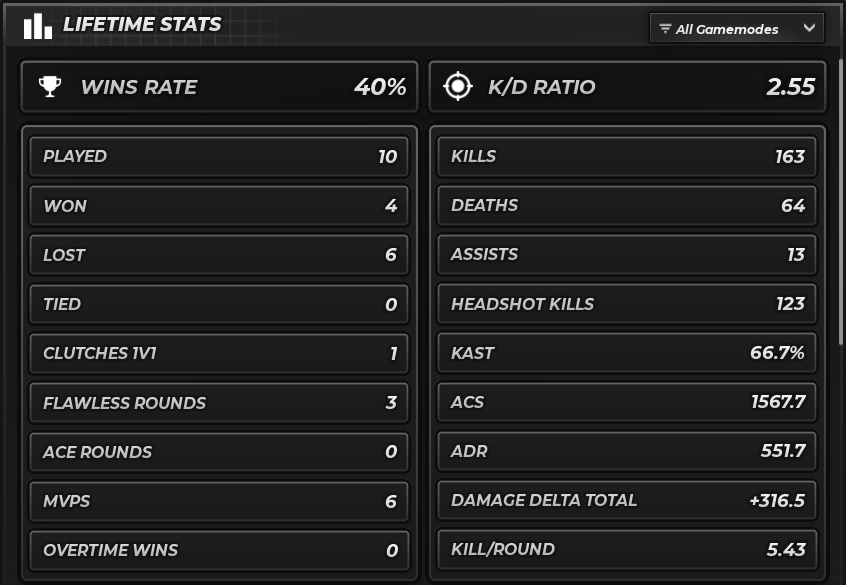
- MVPs counts how many times you earned MVP in a round your team won.
- Clutches 1v1 counts rounds you won as the last player on your team against one remaining opponent.
- Flawless Rounds counts rounds your team won without losing a player.
- Ace Rounds counts rounds where you eliminated the entire opposing team yourself.
- Overtime Wins tracks matches won in overtime.
K/D, KAST, ACS, and ADR
The right side of Lifetime Stats shows what you did in those matches. K/D is a quick snapshot of your kills and deaths. KAST, ACS, and ADR tell you more about what happened round to round.
- K/D Ratio (Kill/Death Ratio) is your total kills divided by your total deaths. A 2.55 K/D means you averaged 2.55 kills per death.
- Headshot Kills counts kills you finished with a headshot.
- KAST (Kill, Assist, Survive, Trade) is the percentage of rounds where you got a kill, got an assist, survived, or had a teammate trade your death by killing the opponent who got you. A round counts once even if you meet several of those conditions.
- ACS (Average Combat Score) is your average combat score per round. It reflects actions such as kills, multi-kills, first bloods, assists, and planting or defusing the bomb.
- ADR (Average Damage per Round) is how much damage you deal per round on average. It captures damage you deal even when a teammate finishes the kill.
- Damage Delta Total compares damage dealt with damage taken. A positive number means you dealt more damage than you took. A negative number means you took more than you dealt.
- Kill/Round is the number of kills you average per round.
Scroll down in Overview to see how your stats break down by side and by buy type.
Accuracy and Hit Locations
The Accuracy panel answers two questions. Average tells you how often your shots hit, while Head, Body, and Legs show where those hits landed.
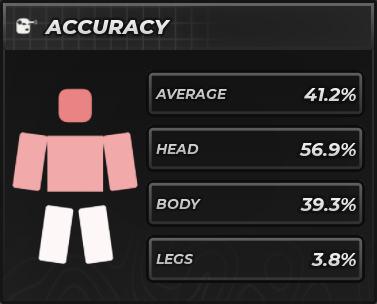
Your weapon choice affects this breakdown. If you’re practicing head-level aim with a rifle, track your head hits with that rifle over time. If you play a lot of AWP, expect more body hits, since a body shot can often finish the job.
Weapons Stats: Damage, Hits, and Headshots
Open the Weapons Stats tab to see each weapon’s kills, share of your total kills, damage per match, and kills per match. Select a weapon to open its detail panel, then expand the rows on the right.
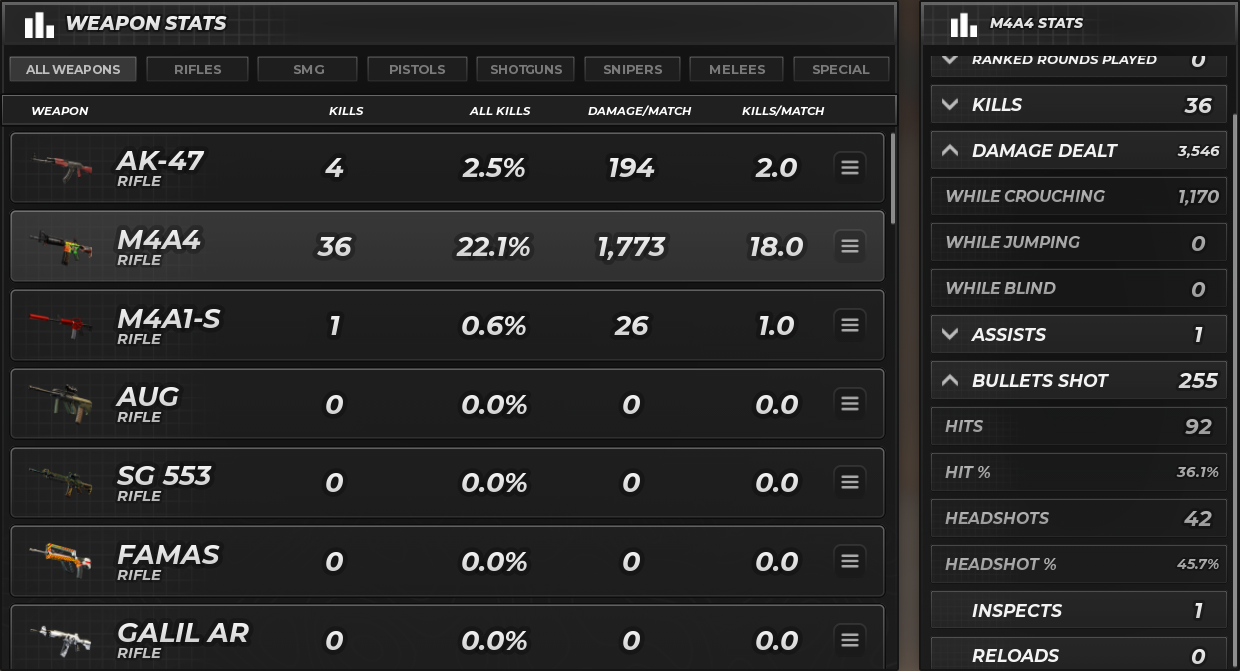
- Damage Dealt shows your total damage with the selected weapon and how much you dealt while crouching, jumping, or blinded. If you’re working on your crouch spray, this gives you a way to track how much damage you deal from that position.
- Bullets Shot shows shots fired, hits, hit percentage, headshots, and headshot percentage. The M4A4 above landed 92 of 255 shots for a 36.1% hit rate. Of those 92 hits, 42 were headshots, giving it a 45.7% headshot rate.
- Inspects counts how many times you inspected the weapon. It’s a fun one to check if you’ve been showing off a favorite skin.
If you’re practicing with a specific gun, compare its hit rate and headshot percentage over time. Aiming for a single headshot with a Deagle and controlling a spray with an M4A4 are different skills, so give each weapon its own baseline.
Got a question about your stats or want to share your progress? Join the Discord.